1

Install .NET 8 to follow allong

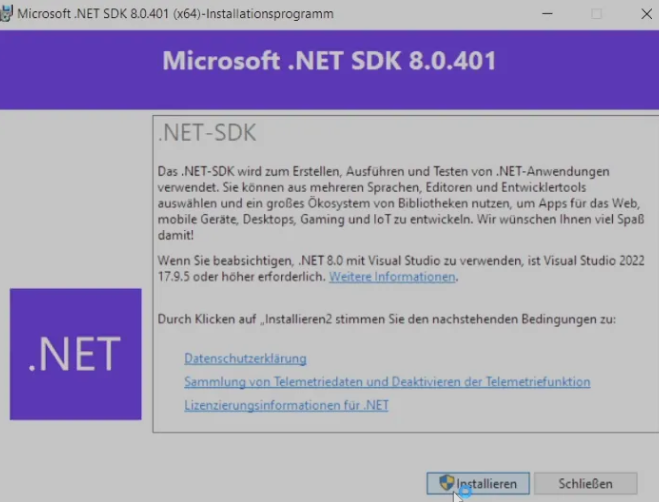
You need to install .net8 from Microsofts Official Website:Download .NET 8netimage.pngCheck if the installation was successful
>_ Terminal
dotnet --version
Result should be: Version: 8.0 or higher
You could optionally install Git for a commit based follow allong:Download Git
2

New Step

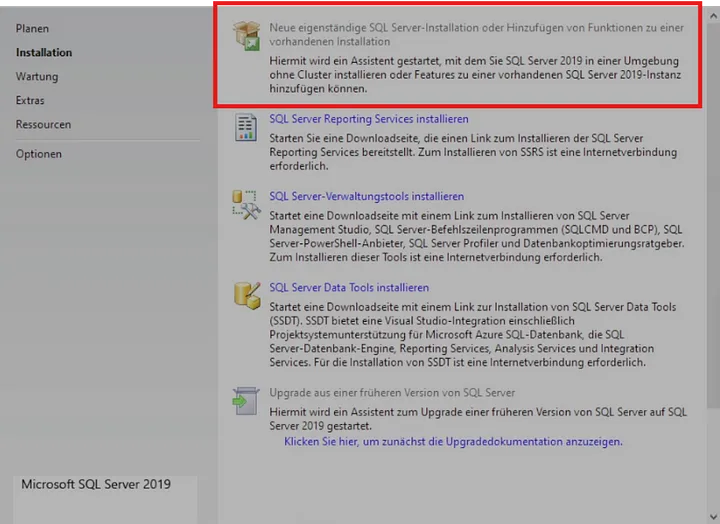
  • SQL Server Express First: By installing SQL Server Express first, you ensure that the database engine is set up and ready to go. This is the core service that SSMS will connect to and manage. 1_nz7qib_-krOhvcmcTkQaVA.webp
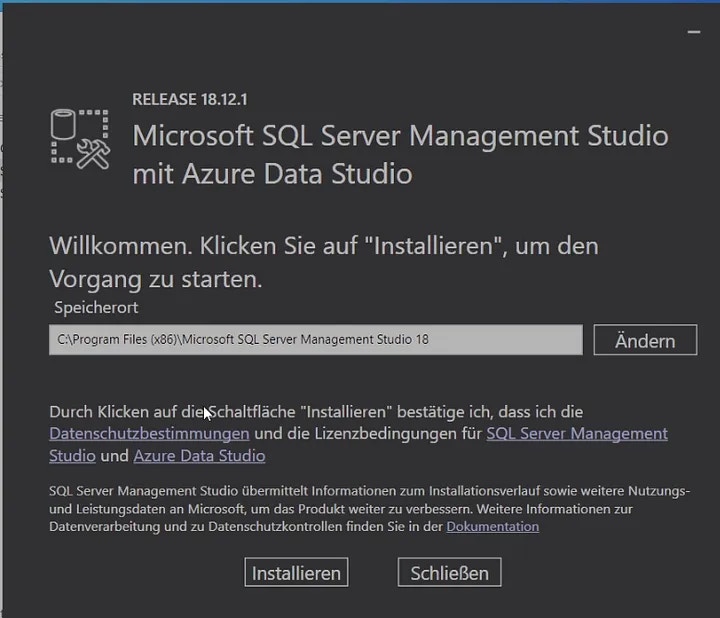
  • SSMS (the Setup) After: Once SQL Server Express is installed, you can then install SSMS. SSMS will detect the SQL Server Express instance during installation, making it easier to connect to and manage your databases right away. 1_8rfebHAe1KTiSgBuEi1pKw.webp
    Install Visual Studio

    • Make sure to start the setup normally from the Visual Studio Folder.
    • Choose C#-related Workloads.
    • Let the Installer install:
    • After the base installation is finished (Restart the Pc if needed)
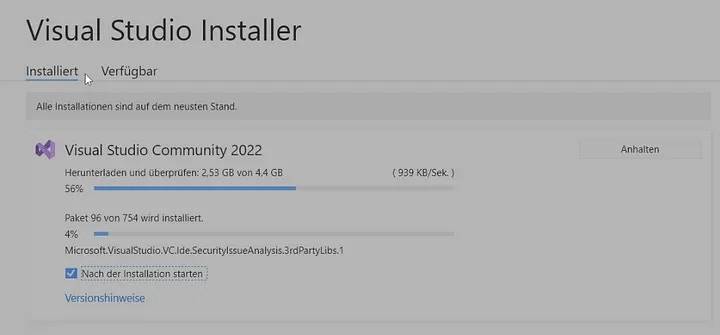
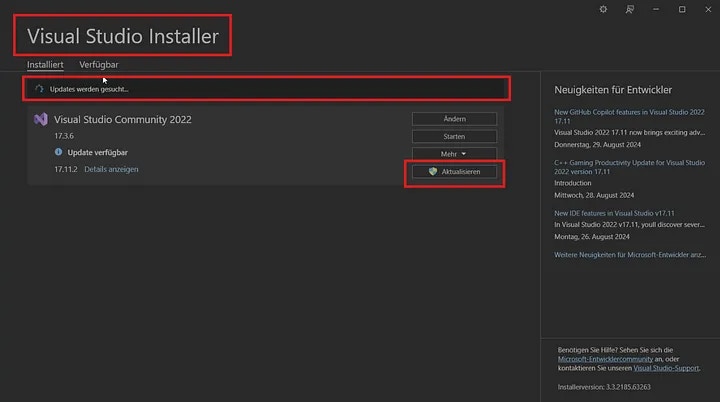
    • You should at least close your Studio once, and start the Installer again — if .NET 8 is installed correctly an Update-Button will show up: 1_Tc_UIiu2dengCXCcRTMSeQ.webp 1_Xmw_KWmDfpWsqCleHQaM3g.webp
3

Fitting Template

App with more complex relations

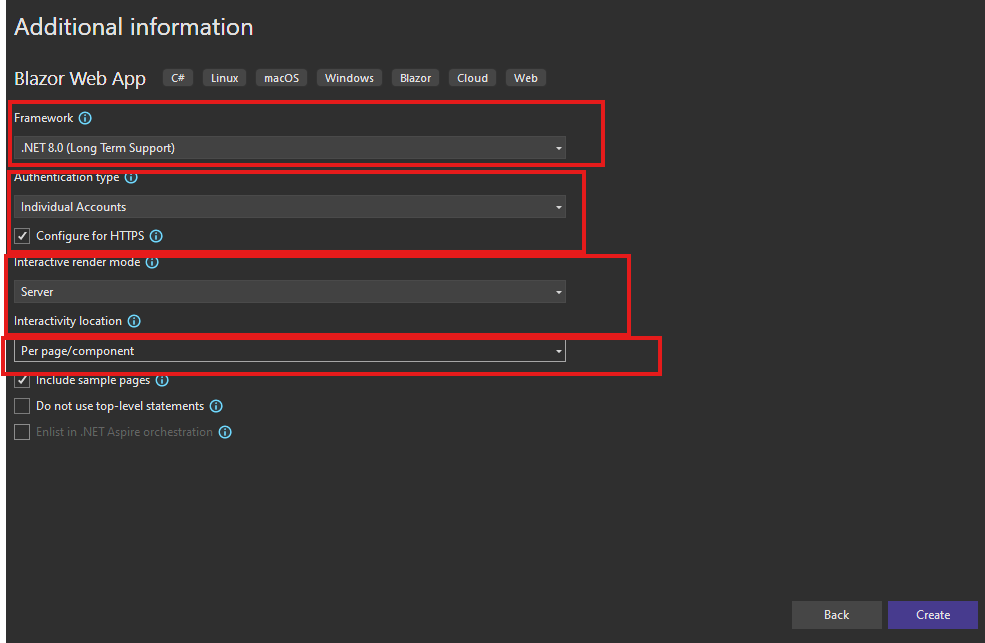
For the most modern Template, use the Blazor Web App Template:Very important! select Individual Accounts, to have an secure authentication system from the startup without any extra work.Very Important! select RenderMode Server !Another Thing to do right in the beginning is to adjust the Connection String
4

JsonSettings

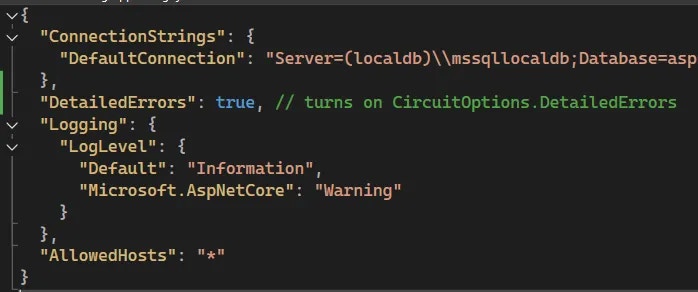
Before you begin coding, make sure to enable Detailed Errors. While you shouldn’t encounter too many issues, it’s important that any errors that do occur are as detailed as possible. You can do this in your .json File.1_jvdS3nPaL9rfBRCpRUvbKA.webp
appsettings.json
  "DetailedErrors": true, // turns on CircuitOptions.DetailedErrors
Another Thing to do right in the beginning is to adjust the Connection StringIf you are using SQL-Server Express you can this:Before the first “\\” you need to use the exact Name of the Server that you can find here:1_uc0WfTdjke5ktKOrGNHsXQ.webpin this example localdb but not always!
    "DefaultConnection": "Server=DESKTOP-C6JNJAT\\SQLEXPRESS;Database=DoctorManagement;Trusted_Connection=True;TrustServerCertificate=True;MultipleActiveResultSets=True;"
otherwise you can just keep the localdb and add local db in your Management studio like this:
 "DefaultConnection": "Server=(localdb)\\mssqllocaldb;Database=aspnet-ExampleSetup-0fed3dee-74be-4830-a1b7-	e7b8dc7511c0;Trusted_Connection=True;MultipleActiveResultSets=true"
You can also just use the integrated SQL Server Object Explorer to manipulate Values in the Database.1_QQu6DJR2ZcH7T39VZsLDeQ.webp
5

Create Models

1_1VCmkCw5s2K1dMaI78BJaQ.webp**Deleting **the default Migrations folder ensures a clean start by removing unnecessary files before your first database push.Add an DbSet for each of your Models — Without a DbSet for each model, the class remains standalone and will not be tracked or pushed to the database.
ModellBeziehungElternteilKinderteilEF Core Implementierung
DeveloperMehrere VideoGames können 1en Developer habenDeveloperVideoGameIm VideoGame Element eine Referenz zu Developer und einmal DeveloperId
PublisherMehrere VideoGames können 1en Publisher habenPublisherVideoGameIm VideoGame Element eine Referenz zu Publisher und einmal PublisherId
VideoGameDetails1 VideoGame kann 1e VideoGameDetails haben (1:1)VideoGameVideoGameDetailsIm VideoGameDetails Element eine Referenz zu VideoGame und einmal VideoGameId
VideoGameGenreMehrere VideoGames können mehrere Genres haben (N:N)VideoGame/GenreVideoGameGenreIm VideoGameGenre Element eine Referenz zu VideoGame und Genre sowie VideoGameId und GenreId
Models / Publisher.cs
  public class Publisher
    {
        public int Id { get; set; }
        public string Name { get; set; }
    }
Models / Developer.cs
 public class Developer
    {
        public int Id { get; set; }
        public string Name { get; set; }

    }
The Main EntryMask
 public class VideoGame
    {
        public int Id { get; set; }
        public string? Title { get; set; }
        public string? Platform { get; set; }
        
        //1 Developer can have many Games
        public int DeveloperId { get; set; }
        public Developer? Developer { get; set; }

        //1 Publisher can have many Games
        public int PublisherId { get; set; }
        public Publisher? Publisher { get; set; }
        
        //1 Game has 1 VideoGameDetails
        // 1:1 => NavigationPropertys (conveniant for queriying)
        public VideoGameDetails? VideoGameDetails { get; set; }

        //N:N

        //DO NOT DO THE OTHER ONE FOR GOD's SAKE
        public ICollection<VideoGameGenre>? VideoGameGenres { get; set; } = new List<VideoGameGenre>();
    }
 public class VideoGameDetails
    { 
       public int Id { get; set; }
       public string? Description { get; set; }
       public DateTime ReleaseDate { get; set; }
       public int VideoGameId { get; set; }
    }
   public class VideoGameGenre
    {
        public int Id { get; set; }

        //first N
        public int VideoGameId { get; set; }
        public VideoGame VideoGame { get; set; }


        //second N
        public int GenreId { get; set; }
        public Genre Genre { get; set; }
    }
namespace VideoGameTest.Data.Models
{
    public class Genre
    {
        public int Id { get; set; }
        public string Name { get; set; }
        public ICollection<VideoGameGenre>? VideoGameGenres { get; set; } = new List<VideoGameGenre>();
    }
}
Make sure to make an Migration now:add-migration "start"Make sure to make an Update after:update-database
6

Data/ApplicationDbContext.cs

 public class ApplicationDbContext(DbContextOptions<ApplicationDbContext> options) : IdentityDbContext<ApplicationUser>(options)
 {
     public DbSet<VideoGame> VideoGames { get; set; }
     public DbSet<VideoGameDetails> VideoGameDetails { get; set; }
     public DbSet<Developer> Developers { get; set; }
     public DbSet<Publisher> Publishers { get; set; }
     public DbSet<Genre> Genre { get; set; }

     //N:N VideoGame N Genres
     public DbSet<VideoGameGenre> VideoGameGenres { get; set; }
     protected override void OnModelCreating(ModelBuilder modelBuilder)
     {
         //Neccesary (also for EFcore to build the Identity Tables if you have that activated): 
         base.OnModelCreating(modelBuilder);
     }
 }
7

Create a Service

You can skip creating an Interface since it is not necessary after all and can steal you time in a testing enviroment.
public class AppService
{
    private readonly ApplicationDbContext _context;
    public AppService(ApplicationDbContext context)
    {
        _context = context;
    }
    public async Task<List<Developer>> ListDevelopersAsync()
    {
        return await _context.Developers.ToListAsync();
    }
    public async Task<List<Publisher>> ListPublishersAsync()
    {
        return await _context.Publishers.ToListAsync();
    }
    public async Task<List<Genre>> ListGenresAsync()
    {
        return await _context.Genre.ToListAsync();
    }
    public async Task<List<VideoGame>> ListVideoGamesAsync()
    {
        return await _context.VideoGames
            .Include(g => g.VideoGameDetails)
            .Include(g => g.VideoGameGenres)
                .ThenInclude(gg => gg.Genre)
            .Include(g => g.Developer)
            .Include(g => g.Publisher)
            .ToListAsync();
    }

    //CREATE
    public async Task AddVideoGameAsync(VideoGame game)
    {
        _context.VideoGames.Add(game);
        await _context.SaveChangesAsync();
    }

    //DELETE
    public async Task DeleteVideoGameAsync(int id)
    {
        var game = await _context.VideoGames.FindAsync(id);

        if (game != null)
        {
            _context.VideoGames.Remove(game);
            await _context.SaveChangesAsync();
        }
    }
    public async Task<VideoGame?> GetVideoGameByIdAsync(int id)
    {
        return await _context.VideoGames.FindAsync(id);
    }

    //UPDATE
    public async Task UpdateGameAsync(VideoGame game)
    {
        _context.Update(game);
        await _context.SaveChangesAsync();
    }
}
Extremly Important
Program.cs
builder.Services.AddScoped<AppService>();
8

Upsert Entry Mask

Game.razor
@page "/game"
@page "/game/{id:int?}"
@using VideoGameTest.Data.Models
@inject NavigationManager NavigationManager
@inject AppService appservice
@rendermode InteractiveServer

<h3>Game</h3>


@if (videoGame?.VideoGameDetails == null)
{
    <p> <em> Loading</em></p>
}
else
{
     <p>@(id != 0 ? "Editing existing Game" : "Creating new game")</p>

    //Formname is extremly important:
    <EditForm Model="videoGame" OnValidSubmit="HandleValidSubmit" FormName="CreateVideoGameForm">


        <div class="form-group mb-3">
            <label for="productName">Product Name:</label>
            <InputText id="productName" class="form-control" @bind-Value="videoGame.Title" placeholder="Enter product name" />
        </div>

         <div class="form-group mb-3">
            <label for="startdate">Release Date</label>
            <InputDate id="startdate" class="form-control" @bind-Value="videoGame.VideoGameDetails.ReleaseDate" />
        </div>

        <div class="form-group mb-3">
            <label for="description">Description</label>
            <InputTextArea id="startdate" class="form-control" @bind-Value="videoGame.VideoGameDetails.Description" />
        </div>


        @if (developers != null)
        {
            <div class="form-group mb-3">
                <label for="developerSelect">Developer:</label>
                <InputSelect id="developerSelect" class="form-control" @bind-Value="videoGame.DeveloperId">
                    @foreach (var developer in developers)
                    {
                        <option value="@developer.Id">@developer.Name</option>
                    }
                </InputSelect>
            </div>
        }

        @if (publishers != null)
        {
            <div class="form-group mb-3">
                <label for="publisherSelect">Developer:</label>
                <InputSelect id="publisherSelect" class="form-control" @bind-Value="videoGame.PublisherId">
                    @foreach (var publisher in publishers)
                    {
                        <option value="@publisher.Id">@publisher.Name</option>
                    }
                </InputSelect>
            </div>
        }

        <div class="form-group mb-3">
            <label>Tags</label>
            <button type="button" class="btn btn-secondary mb-2" @onclick="AddGenreToGame">
                <i class="bi bi-plus"></i> Add Tag
            </button>

            <table class="table">
                <thead>
                    <tr>
                        <th>Tag</th>
                        <th>Actions</th>
                    </tr>
                </thead>
                <tbody>
                    @foreach (var videoGameGenre in videoGame.VideoGameGenres)
                    {
                        <tr>
                            <td>
                                <InputSelect class="form-control" @bind-Value="videoGameGenre.GenreId">
                                    @*                                      <option value="">Select a tag...</option>*@
                                    @foreach (var genre in genres)
                                    {
                                        <option value="@genre.Id">@genre.Name</option>
                                    }
                                </InputSelect>
                            </td>
                            <td>
                                <button type="button" class="btn btn-danger btn-sm" @onclick="() => RemoveGenre(videoGameGenre)">
                                    <i class="bi bi-trash"></i> Remove
                                </button>
                            </td>
                        </tr>
                    }
                </tbody>
            </table>
        </div>


        <div class="form-group">
            <button type="submit" class="btn btn-primary">Save</button>
        </div>
    </EditForm>
}

@code {

    [Parameter]
    public int id { get; set; }

    private bool isEditMode => id != 0;

    //initialize for the Editform
    private VideoGame videoGame = new()
    {
            Title = "amazing Game",

            //the 1:1 Object
            VideoGameDetails = new VideoGameDetails
            {
                Description = "this game has it all",
                ReleaseDate = DateTime.Today,
                // VideoGameId is optional here – will be set after insert

            }
    };


    #region genres

    private List<Genre> genres = new();
    private int? selectedTagId;

    private List<Developer> developers = new();

    private List<Publisher> publishers = new();

    private void AddGenreToGame()
    {
        videoGame.VideoGameGenres.Add(new VideoGameGenre());
    }

    private void RemoveGenre(VideoGameGenre videoGameGenre)
    {
        videoGame.VideoGameGenres.Remove(videoGameGenre);
    }

    #endregion

    protected override async Task OnInitializedAsync()
    {
        genres = await appservice.ListGenresAsync();
        developers = await appservice.ListDevelopersAsync();
        publishers = await appservice.ListPublishersAsync();

        //Set a default => Developer
        if (developers.Any())
        {
            videoGame.DeveloperId = developers.First().Id;
        }

        //Set a default => Publisher
        if (publishers.Any())
        {
            videoGame.PublisherId = publishers.First().Id;
        }

        if (isEditMode)
        {
            var loaded = await appservice.GetVideoGameByIdAsync(id);
            if (loaded != null)
            {
                //Load Main Object
                videoGame = loaded;
            }
        }
    }

    private async Task HandleValidSubmit()
    {
        
        // Remove any VideoGameGenres that don't have a GenreId selected
        videoGame.VideoGameGenres = videoGame.VideoGameGenres
            .Where(x => x.GenreId != 0)
            .ToList();

        if (isEditMode)
        {
            await appservice.UpdateGameAsync(videoGame);
        }
        else
        {
            await appservice.AddVideoGameAsync(videoGame);
        }

        NavigationManager.NavigateTo("/games");
    }
}
9

List all Games

@page "/games"
@using VideoGameTest.Data.Models
@inject NavigationManager navman
@inject IJSRuntime JSRuntime
@rendermode InteractiveServer
@inject AppService appservice

<h3>Games List</h3>


<a href="/game">Create a Game</a>

@if (games == null)
{
    <p><em>Loading games...</em></p>
}
else if (!games.Any())
{
    <p><em>No games available.</em></p>
}
else
{
    <div class="table-responsive">
        <table id="gamesTable" class="table table-striped table-hover">
            <thead class="thead-light">
                <tr>
                    <th scope="col">Name</th>
                    <th scope="col">Developer</th>
                    <th scope="col">Publisher</th>
                    <th scope="col">ReleaseDate</th>
                    <th scope="col">Description</th>
                    <th scope="col">Genres</th>
                    <th scope="col">Delete</th>
                </tr>
            </thead>
            <tbody>
                @foreach (var game in games)
                {
                    <tr>
                        <td>@game.Title</td>
                        <td>@(game.Developer?.Name ?? "N/A")</td>
                        <td>@(game.Publisher?.Name ?? "N/A")</td>
                        <td>@(game.VideoGameDetails?.ReleaseDate.ToString() ?? "N/A")</td>
                        <td>@(game.VideoGameDetails?.Description?.ToString() ?? "N/A")</td>
                        <td>
                                 @if (game.VideoGameGenres?.Any() == true)
                                {
                                    <span>@string.Join(", ", game.VideoGameGenres.Where(pt => pt.Genre != null).Select(pt => pt.Genre.Name))</span>
                                }
                                else
                                {
                                    <span class="text-muted">No genres</span>
                                } 
                        </td>
                        <td>
                    <a href="/game/@game.Id" class="btn btn-sm btn-primary">Edit</a>
                                                <button type="button" class="btn btn-sm btn-danger" @onclick="() => HandleDelete(game.Id)">
                                Delete
                            </button>
                        </td>
                    </tr>
                }
            </tbody>
        </table>
    </div>
}

@code {

    private List<VideoGame>? games;

    public async void HandleDelete(int id)
    {
        await appservice.DeleteVideoGameAsync(id);
        navman.NavigateTo("/games", true);
    }

    protected override async Task OnInitializedAsync()
    {
        games = await appservice.ListVideoGamesAsync();
    }

//Uncomment this first
    protected override async Task OnAfterRenderAsync(bool firstRender)
    {
        if (firstRender && games?.Any() == true)
        {
            await JSRuntime.InvokeVoidAsync("initializeDataTable");
        }
    }
}

10

Create a Datagrid for searching and filtering

Screenshot 2025-05-26 170928.pngGo inside or create this File
#gamesTable => this value depends on what you have used in the Games.razor
function initializeDataTable() {
    // Add the search inputs to each header cell
    $('#gamesTable thead tr')
        .clone(true)
        .addClass('filters')
        .appendTo('#gamesTable thead');

    $('#gamesTable').DataTable({
        orderCellsTop: true,
        fixedHeader: true,
        initComplete: function () {
            var api = this.api();

            // For each column
            api.columns().eq(0).each(function (colIdx) {
                // Skip the Actions column
                if (colIdx === 6) return;

                // Add a search input
                var cell = $('.filters th').eq(colIdx);
                var title = $(cell).text();
                $(cell).html('<input type="text" class="form-control form-control-sm" placeholder="Search ' + title + '" />');

                // Add search functionality
                $('input', $('.filters th').eq(colIdx))
                    .on('keyup change', function () {
                        if (api.column(colIdx).search() !== this.value) {
                            api
                                .column(colIdx)
                                .search(this.value)
                                .draw();
                        }
                    });
            });
        },
        language: {
            search: "Search all:",
            lengthMenu: "Show _MENU_ entries",
            info: "Showing _START_ to _END_ of _TOTAL_ entries",
            paginate: {
                first: "First",
                last: "Last",
                next: "Next",
                previous: "Previous"
            }
        },
        pageLength: 10,
        order: [[0, 'asc']], // Sort by first column (Name) ascending
        columnDefs: [
            { orderable: false, targets: 6 }, // Disable sorting on the Actions column (if its the 7 then 6 because of the index)
            { searchable: false, targets: 6 } // Disable searching on the Actions column (if its the 7 then 6 because of the index)
        ]
    });
} 
Inside of the File MainLayout. (just search for it:)
<--!--->

<HeadContent>
    <link href="https://cdn.datatables.net/1.13.7/css/dataTables.bootstrap5.min.css" rel="stylesheet" />
    <link href="https://cdn.datatables.net/fixedheader/3.4.0/css/fixedHeader.bootstrap5.min.css" rel="stylesheet" />
    <style>
        thead tr.filters {
            background-color: #f8f9fa;
        }
        thead tr.filters th {
            padding: 0.5rem;
        }
        thead tr.filters input {
            width: 100%;
            padding: 0.25rem;
            box-sizing: border-box;
        }
    </style>
    <script src="https://code.jquery.com/jquery-3.7.0.min.js"></script>
    <script src="https://cdn.datatables.net/1.13.7/js/jquery.dataTables.min.js"></script>
    <script src="https://cdn.datatables.net/1.13.7/js/dataTables.bootstrap5.min.js"></script>
    <script src="https://cdn.datatables.net/fixedheader/3.4.0/js/dataTables.fixedHeader.min.js"></script>
    <script src="js/site.js"></script>
</HeadContent>

<--!--->
11

Validations

image.png
Game.razor
@using Blazored.FluentValidation
@using FluentValidation
@inject IValidator<VideoGame> VideoGameValidator

//Inside EditForm


          <FluentValidationValidator />

        <ValidationSummary />
Create this Folder =>image.pngInside here create your ValidationFile:
VideoGameValidator.cs
using FluentValidation;
using VideoGameTest.Data.Models;

namespace VideoGame3.Validations
{
    public class GameValidator : AbstractValidator<VideoGame>
    {
        public GameValidator()
        {
            RuleFor(x => x.Title)
            .NotEmpty().WithMessage("Name is required.");

            RuleFor(x => x.Title)
            .MaximumLength(23).WithMessage("Name not so long please.");

            RuleFor(x => x.VideoGameDetails.Description).MaximumLength(100).WithMessage("Description not so long bro");

 RuleFor(x => x.VideoGameGenres)
     .Must(genres => genres != null && genres.Count >= 1)
     .WithMessage("At least one tag must be selected.")
     .Must(genres => genres == null || genres.Count <= 3)
     .WithMessage("Maximum 3 tags can be selected.");
        }
    }
}

Register the Validation:
Program.cs
using FluentValidation;
builder.Services.AddScoped<IValidator<VideoGame>, GameValidator>();

More on Modeling:

🧠 How to Perfectly Emit an Entity-Relationship Model (ERM)

Designing a solid ERM starts with thinking from the UI and data workflow — then translating that into clean, normalized entities.

📍 Step-by-Step Mental Model

1. Start with the Main Entry Form (Master Entity)

What is the main thing the user creates?
🠖 This becomes your primary table/entity.
Example:
  • Creating a “Product”? → Product is the main entity.
  • Also think which data can i seed? and does not need an entry by myself

2. One-to-Many (1:N): Child Needs Foreign Key

If you add multiple things under the main form (like tags, comments, or bookings),
then the child holds the foreign key.
Rule:
🔁 “Many points to one — the many-side gets the FK.”
Example:
public class Comment
{
    public int Id { get; set; }
    public string Text { get; set; }

    public int ProductId { get; set; } // FK to Product since comment is a child
    public Product Product { get; set; } = null!;
}

3. One-to-One (1:1): Either Side Gets the FK, Prefer Dependent

Used when you split detailed data into a second table (e.g. UserDetails, VideoGameDetails).
Tip:
Put the FK on the dependent (the one that wouldn’t exist without the parent).
Example:
public class VideoGameDetails
{
    public int Id { get; set; }
    public string Description { get; set; }

    public int VideoGameId { get; set; }
    public VideoGame VideoGame { get; set; } = null!;
}

4. Many-to-Many (N:N): Needs a Join Table

For multiselects or tagging — like Products with multiple Categories.
You need a middle table that holds 2 foreign keys.
public class ProductCategory
{
    public int ProductId { get; set; }
    public Product Product { get; set; } = null!;

    public int CategoryId { get; set; }
    public Category Category { get; set; } = null!;
}

💡 UI-Based Thinking = Smarter Modeling

UI ElementERM PatternFK Location
Single dropdown1:NIn main entity
List of items under main record1:NIn child entity
Detail page/tab with extra fields1:1In dependent detail
Multiselect (e.g. categories/tags)N:NIn join table

✅ Final Checklist

  • Start from user workflows / forms
  • For each “added element” → ask “does this exist without the parent?”
  • Normalize repetitive data into lookup/reference tables
  • Avoid putting collections on both sides unless needed
  • Always define clear PK/FK logic

Validations

FluentValidation in Blazor: UI Integration & 50+ Rule Examples

This guide provides a full reference on how to use FluentValidation in a Blazor project, including hardcoded validations, live UI updates, and more than 50 practical validation rule examples.

📦 Setup FluentValidation in Blazor

  1. Install the NuGet package:
dotnet add package FluentValidation
dotnet add package Blazored.FluentValidation
  1. Register services in Program.cs:
builder.Services.AddValidatorsFromAssemblyContaining<MyValidator>();

🧠 Core Concept: Validation with FluentValidation

  • Create a model class (e.g. Purchase)
  • Create a corresponding validator
  • Bind it to the form in Blazor with FluentValidationValidator

✅ Hardcoded Entry Validation Example

Model

public class Purchase
{
    public string? DiscountCode { get; set; }
}

Validator

public class PurchaseValidator : AbstractValidator<Purchase>
{
    private static readonly string[] validCodes = ["student25", "summer10", "welcome50"];

    public PurchaseValidator()
    {
        RuleFor(x => x.DiscountCode)
            .Must(code => string.IsNullOrEmpty(code) || validCodes.Contains(code.ToLower()))
            .WithMessage("Invalid discount code.");
    }
}

🖥️ UI Integration in Razor

<EditForm Model="@purchase" OnValidSubmit="Submit">
    <FluentValidationValidator />
    <InputText @bind-Value="purchase.DiscountCode" />
    <ValidationMessage For="@(() => purchase.DiscountCode)" />
    <button type="submit">Submit</button>
</EditForm>

@code {
    private Purchase purchase = new();
}

📚 50+ FluentValidation Rule Examples

RuleFor(x => x.Name).NotEmpty();
RuleFor(x => x.Age).GreaterThan(18);
RuleFor(x => x.Email).EmailAddress();
RuleFor(x => x.Password).MinimumLength(8);
RuleFor(x => x.Password).Matches("[A-Z]").WithMessage("Must contain uppercase letter.");
RuleFor(x => x.Password).Matches("[0-9]").WithMessage("Must contain a number.");
RuleFor(x => x.Username).Length(3, 20);
RuleFor(x => x.Country).NotNull();
RuleFor(x => x.TermsAccepted).Equal(true).WithMessage("You must accept the terms.");

RuleFor(x => x.Price).InclusiveBetween(1, 1000);
RuleFor(x => x.StartDate).LessThan(x => x.EndDate);
RuleFor(x => x.BirthDate).Must(date => date < DateTime.Today).WithMessage("Birthdate must be in the past.");

RuleFor(x => x.Phone).Matches(@"^\d{10}$");
RuleFor(x => x.ZipCode).Matches(@"^[0-9]{5}$");
RuleFor(x => x.UserRole).IsInEnum();
RuleFor(x => x.Score).GreaterThanOrEqualTo(0).LessThanOrEqualTo(100);

RuleFor(x => x.CustomField).Must(BeCustomValid).WithMessage("Custom logic failed.");
RuleSet("AdminRules", () => {
    RuleFor(x => x.AdminCode).NotEmpty();
});

RuleForEach(x => x.Tags).NotEmpty();
RuleForEach(x => x.Tags).MaximumLength(20);

RuleFor(x => x.Email).NotEmpty().When(x => x.IsSubscribed);
RuleFor(x => x.DiscountCode).Must(code => ValidCodes.Contains(code)).WithMessage("Invalid discount");

RuleFor(x => x.JsonData).Must(BeValidJson).WithMessage("Must be valid JSON.");
RuleFor(x => x.ListItems).NotEmpty().WithMessage("At least one item required.");
RuleFor(x => x.PasswordConfirmation).Equal(x => x.Password).WithMessage("Passwords do not match.");

RuleFor(x => x.FileName).Must(name => Path.GetExtension(name) == ".pdf");
RuleFor(x => x.HtmlContent).Must(content => !content.Contains("<script")).WithMessage("No scripts allowed.");

RuleFor(x => x.Gender).Must(g => g == "M" || g == "F");
RuleFor(x => x.NewsletterConsent).Equal(true).When(x => x.Email != null);

RuleFor(x => x.Iban).CreditCard().WithMessage("Invalid IBAN format.");
RuleFor(x => x.Url).Must(url => Uri.TryCreate(url, UriKind.Absolute, out _));
RuleFor(x => x.Hour).InclusiveBetween(0, 23);

RuleFor(x => x.Password).Must(p => p.Any(char.IsSymbol)).WithMessage("Use at least one symbol.");
RuleFor(x => x.Balance).GreaterThanOrEqualTo(0).WithMessage("Cannot be negative.");
RuleFor(x => x.ImageFile).Must(file => file.Length < 2_000_000).WithMessage("File too large.");

RuleFor(x => x.ApprovalDate).GreaterThan(DateTime.Today.AddDays(-1));
RuleFor(x => x.Timezone).Must(tz => TimeZoneInfo.GetSystemTimeZones().Any(z => z.Id == tz));
RuleFor(x => x.DepartmentId).NotEqual(0).WithMessage("Please select a department.");

RuleFor(x => x.UniqueName).MustAsync(async (name, _) => await CheckUniqueness(name));
RuleFor(x => x.Age).GreaterThan(0).When(x => x.IsHuman);

RuleFor(x => x.Details.Length).LessThanOrEqualTo(1000);
RuleFor(x => x.Id).GreaterThan(0).WithMessage("ID must be greater than 0.");

⏱️ Zeitbezogene Regeln (Zeitpunkte, Start/Ende, Dauer)

✅ Startzeit < Endzeit

RuleFor(x => x.End)
    .GreaterThan(x => x.Start)
    .WithMessage("Endzeit muss nach Startzeit liegen.");

✅ Startzeit darf nicht in der Vergangenheit liegen

RuleFor(x => x.Start)
    .GreaterThanOrEqualTo(DateTime.Now)
    .WithMessage("Startzeit darf nicht in der Vergangenheit liegen.");

✅ Mindestdauer von 15 Minuten

RuleFor(x => x.End - x.Start)
    .Must(duration => duration.TotalMinutes >= 15)
    .WithMessage("Zeitraum muss mindestens 15 Minuten betragen.");

✅ Maximaldauer 8 Stunden

RuleFor(x => x.End - x.Start)
    .Must(duration => duration.TotalHours <= 8)
    .WithMessage("Ein Arbeitstag darf 8 Stunden nicht überschreiten.");

📅 Tages- und Wochenvalidierung

✅ Kein Wochenende erlaubt

RuleFor(x => x.Date)
    .Must(date => date.DayOfWeek != DayOfWeek.Saturday && date.DayOfWeek != DayOfWeek.Sunday)
    .WithMessage("Buchungen am Wochenende sind nicht erlaubt.");

✅ Innerhalb der Arbeitswoche (Mo–Fr)

RuleFor(x => x.Date)
    .Must(date => date.DayOfWeek is >= DayOfWeek.Monday and <= DayOfWeek.Friday)
    .WithMessage("Nur Wochentage erlaubt.");

📆 Zeiträume & Kollisionen (verfügbare Slots)

✅ Zeitraum nicht mit bestehender Buchung überlappend (Pseudo-Beispiel)

RuleFor(x => x)
    .Must((model, context) => !IsTimeSlotTaken(model.Start, model.End))
    .WithMessage("Der Zeitraum ist bereits belegt.");

⏳ Zeiterfassung & Arbeitszeit

✅ Gesamtarbeitszeit pro Tag < 10 Stunden

RuleFor(x => x.WorkedMinutes)
    .LessThanOrEqualTo(600)
    .WithMessage("Maximal 10 Stunden pro Tag erlaubt.");

✅ Pause von mindestens 30 Minuten bei mehr als 6 Std.

RuleFor(x => x.BreakMinutes)
    .Must((model, breakMin) => model.WorkedMinutes > 360 ? breakMin >= 30 : true)
    .WithMessage("Ab 6 Stunden Arbeit ist eine Pause von 30 Minuten Pflicht.");

✅ Kein Arbeitseintrag über Mitternacht erlaubt

RuleFor(x => x.End.Day)
    .Equal(x => x.Start.Day)
    .WithMessage("Eintrag darf nicht über Mitternacht gehen.");

🕐 Uhrzeitfenster prüfen

✅ Innerhalb Geschäftszeit (08:00–18:00)

RuleFor(x => x.Start.TimeOfDay)
    .Must(time => time >= TimeSpan.FromHours(8) && time <= TimeSpan.FromHours(18))
    .WithMessage("Nur innerhalb der Geschäftszeiten erlaubt.");

✅ Nicht vor 06:00 Uhr

RuleFor(x => x.Start.TimeOfDay)
    .GreaterThanOrEqualTo(TimeSpan.FromHours(6))
    .WithMessage("Startzeit darf nicht vor 6 Uhr liegen.");

📉 Weitere zeitliche Prüfungen

✅ Pausen dürfen nicht länger als die Arbeitszeit sein

RuleFor(x => x.BreakMinutes)
    .Must((model, breakMins) => breakMins < model.WorkedMinutes)
    .WithMessage("Pausenzeit kann nicht länger als die Arbeitszeit sein.");

✅ Arbeitsdauer muss genau 8 Std. sein (z. B. Pflichtmodell)

RuleFor(x => x.End - x.Start)
    .Must(duration => duration.TotalHours == 8)
    .WithMessage("Die Arbeitsdauer muss exakt 8 Stunden betragen.");

✅ Zeitstempel darf nicht in Zukunft liegen

RuleFor(x => x.Timestamp)
    .LessThanOrEqualTo(DateTime.Now)
    .WithMessage("Zeitpunkt darf nicht in der Zukunft liegen.");

💼 Kalendereinträge

✅ Maximal 3 Termine am selben Tag

RuleFor(x => x)
    .Must((model, context) => GetAppointmentCount(model.Date) < 3)
    .WithMessage("Es sind maximal 3 Termine pro Tag erlaubt.");

✅ Termine dürfen nicht überlappen (Start-Start-Check)

RuleFor(x => x)
    .Must(model => !AppointmentOverlaps(model.Start, model.End))
    .WithMessage("Termin überschneidet sich mit einem bestehenden.");

🧠 Komplexere Regeln

✅ Gleitzeitregelung (z. B. nur 6–20 Uhr erlaubt)

RuleFor(x => x.Start.TimeOfDay)
    .Must(t => t >= TimeSpan.FromHours(6) && t <= TimeSpan.FromHours(20));

✅ Keine Buchungen über 2 Kalendertage

RuleFor(x => (x.Start, x.End))
    .Must(x => x.Start.Date == x.End.Date)
    .WithMessage("Zeiträume dürfen sich nicht über mehrere Tage erstrecken.");

✅ Mindestabstand von 10 Minuten zwischen zwei Einträgen

RuleFor(x => x)
    .Must(x => HasMinimumGapToPrevious(x.Start))
    .WithMessage("Mindestens 10 Minuten Abstand zum vorherigen Eintrag nötig.");

Tips for Live UI Feedback

  • Use <ValidationMessage For="..." /> components
  • Call EditContext.Validate() to trigger validation manually
  • Use .WithMessage() to control user feedback
  • Keep the validator stateless and only reference known external data (e.g. hardcoded arrays)

📦 Resources

Big example

🏗️ Complex App Design with EF Core (Markdown Walkthrough)

🎯 Scenario: Conference Management System

You are tasked with building a Conference Management System. Users can:
  • Create and manage Events (conferences, meetups)
  • Add multiple Sessions to each Event
  • Assign Speakers to Sessions (a Speaker can speak at many Sessions; a Session can have many Speakers)
  • Register multiple Attendees per Event
  • Each Attendee can pick multiple Sessions to attend

🧠 Step-by-Step Mental Model

  1. Main object: Event
  2. Session belongs to exactly one Event → 1:N
  3. Attendee belongs to exactly one Event → 1:N
  4. Session has many Speakers (and vice versa) → M:N
  5. Attendee attends many Sessions (and vice versa) → M:N

🗂️ Final Entity Overview

✅ Event (Parent of Sessions & Attendees)

public class Event
{
    public int Id { get; set; }
    public string Name { get; set; }
}

✅ Session (Child of Event)

public class Session
{
    public int Id { get; set; }
    public string Title { get; set; }

    public int EventId { get; set; } // FK to Event
}

✅ Speaker (Independent)

public class Speaker
{
    public int Id { get; set; }
    public string FullName { get; set; }
}

✅ SessionSpeaker (Join Table for Session ↔ Speaker)

public class SessionSpeaker
{
    public int SessionId { get; set; }
    public int SpeakerId { get; set; }
}

✅ Attendee (Child of Event)

public class Attendee
{
    public int Id { get; set; }
    public string Email { get; set; }

    public int EventId { get; set; } // FK to Event
}

✅ SessionAttendee (Join Table for Session ↔ Attendee)

public class SessionAttendee
{
    public int SessionId { get; set; }
    public int AttendeeId { get; set; }
}

🧠 Relationship Summary Table

EntityParentFK FieldType
SessionEventEventId1:N
AttendeeEventEventId1:N
SessionSpeakerSession, SpeakerSessionId, SpeakerIdM:N (via table)
SessionAttendeeSession, AttendeeSessionId, AttendeeIdM:N (via table)

💡 Why No Navigation Properties?

  • Cleaner and faster DB context generation
  • Easier to control relationships manually in queries
  • Better for APIs where DTOs are custom

📋 Task Flow for Designing This System

Step 1: Think in Screens

  • “Create Event” → Requires Event
  • “Add Session to Event” → Needs Session with EventId
  • “Add Attendee” → Needs Attendee with EventId
  • “Assign Speaker to Session” → Join SessionSpeaker
  • “Attendee picks sessions” → Join SessionAttendee

Step 2: Identify Ownership

  • If an entity wouldn’t exist without another → It’s a child
  • If two things are independent but related → Create a join table

Step 3: Normalize

  • No duplicate speaker names → Put speakers in their own table
  • Same session can appear across events? No? → Link tightly to event

✅ Final Notes

  • Every 1:N → child holds the FK
  • Every M:N → build a join table (no need for nav props)
  • Think first about UI, then about data dependencies

UserService example

To protect a page with authentication: ```razor @attribute [Authorize] ```
using Microsoft.AspNetCore.Components.Authorization;
using Microsoft.AspNetCore.Identity;
using Nigeria.Data;
using System.Security.Claims;    

public class UserService : IUserService
    {
        private readonly AuthenticationStateProvider _authenticationStateProvider;
        private readonly UserManager<ApplicationUser> _userManager;

        public UserService(AuthenticationStateProvider authenticationStateProvider, UserManager<ApplicationUser> userManager)
        {
            _authenticationStateProvider = authenticationStateProvider;
            _userManager = userManager;
        }
        public async Task<string?> GetUserNameAsync()
        {
            var authState = await _authenticationStateProvider.GetAuthenticationStateAsync();
            var user = authState.User;

            return user.Identity?.IsAuthenticated ?? false ? user.Identity.Name : null;
        }

        public async Task<string?> GetUserIdAsync()
        {
            var authState = await _authenticationStateProvider.GetAuthenticationStateAsync();
            var user = authState.User;

            return user.FindFirst(ClaimTypes.NameIdentifier)?.Value;
        }

        public async Task<ApplicationUser?> GetApplicationUserByIdAsync(string userId)
        {
            return await _userManager.FindByIdAsync(userId);
        }

        Task<ApplicationUser?> IUserService.GetApplicationUserByIdAsync(string userId)
        {
            throw new NotImplementedException();
        }

    }

Testplan

✅ Testplan – Beispielvorlage

🗂️ 1. Ziel des Tests

Beschreibt das Ziel des Tests (z. B. Sicherstellen, dass die Registrierung eines Benutzers korrekt funktioniert).
Beispiel: Überprüfung der Benutzerregistrierung mit gültigen und ungültigen Eingaben.

🧪 2. Testumgebung

KomponenteVersion/Details
BetriebssystemWindows 11
.NET Version.NET 8
BrowserChrome 123 / Firefox 118
DatenbankSQL Server 2022
AnwendungstypBlazor Server

🧾 3. Testdaten

Testfall-IDEingabeErwartete Ausgabe
TST001Gültige E-Mail, PasswortRegistrierung erfolgreich
TST002Ungültige E-MailFehlermeldung “ungültige E-Mail”
TST003Leeres PasswortFehlermeldung “Pflichtfeld”
TST004Existierende E-Mail-AdresseFehlermeldung “Benutzer existiert”

📋 4. Ablaufplan des Tests

  1. Anwendung starten
  2. Navigiere zur Registrierungsseite (/register)
  3. Formular mit Testdaten ausfüllen
  4. Auf “Registrieren” klicken
  5. Ergebnis mit Erwartung abgleichen
  6. Ergebnis im Bericht dokumentieren

📄 5. Testbericht

Testfall-IDGetestete FunktionErgebnisBemerkung
TST001Registrierung✅ PassAlles korrekt
TST002E-Mail-Validierung✅ PassFehler korrekt angezeigt
TST003Pflichtfeldprüfung✅ PassValidierung funktioniert
TST004Prüfung auf Duplikate❌ FailKein Fehler, Registrierung erlaubt

📝 6. Zusammenfassung

  • Bestandene Tests: 3 von 4
  • Fehlgeschlagene Tests: 1
  • Empfehlung: Fehlerbehebung bei Prüfung auf bereits registrierte E-Mails

🧩 7. Hinweis zum Datenmodell

Um die getesteten Funktionen klar zuzuordnen, sollte ein Diagramm der Datenbankbeziehungen (ERD) erstellt werden.
Beispielhafte Relationen:
  • User 1:N UserLogins
  • User N:M Roles über UserRoles
  • User 1:N Registrations
Ein solches Diagramm hilft, die Abhängigkeiten und Datenflüsse im Testprozess zu verstehen. https://blazordocs.me/samples/recursive https://blazordocs.me/samples/productexample https://blazordocs.me/samples/sample https://blazordocs.me/samples/time